
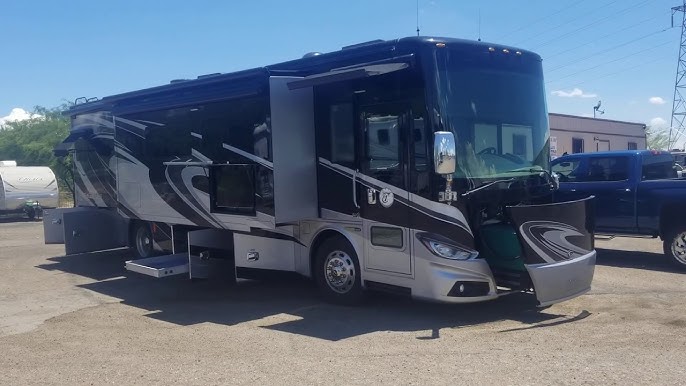
Why Your Tiffin 36GH Front Slides Only Go Out a Few Inches and Stop
If you push the button on your Tiffin 36GH and the front slides creep out about 4 inches, then stop dead — and the lights dim for a second — you are not alone. This is a common issue that leaves many owners scratching their heads. What is really going on under the wall? And more importantly, how do you fix it?
In this guide, we break down exactly why your Tiffin 36GH front slides will go out only a short distance, why the lights dim, and what you can do to get things moving smoothly again. No fancy jargon. Just clear, field-tested answers.
What Is Happening Inside Your Slide System
The front slides on a Tiffin 36GH use a Schwintek or In-Wall motor system. Each side of the slide room often has its own motor. When you push the extend button, the motor pulls the slide out. But if something is blocking or straining the motor, it stops partway.
That dimming light you see? It is the electrical system struggling. The motor draws a lot of power. When it hits a wall — literally or mechanically — the voltage drops. The lights dim. Then when you push the button again, the motor gets a fresh surge and nudges the slide a bit more.
Ever wonder why pushing the button in short bursts eventually gets the slide all the way out? It is because each push gives the motor a moment to reset. But this is not a real fix. It is a band-aid on a deeper issue.
Top Reasons Your Front Slides Stop Partway
Several things can cause your Tiffin 36GH slides to only move a few inches and stop. Here are the most common culprits:
- Debris or Obstruction: Dirt, leaves, or small rocks get under the slide tracks. The motor pushes but cannot move the slide past the blockage.
- Low Battery Power: If your house batteries are weak or deeply discharged, the motor cannot get enough juice to push the slide all the way out. The lights dim because the system is starved for power.
- Weak or Failing Motor: Over time, the Schwintek motor gears wear down. A tired motor can barely move the slide a few inches before it gives out.
- Faulty Limit Switch: The control board tells the motor when to stop. If the switch is bad or misaligned, the motor shuts off too early.
- Cold Weather Stiffness: In cold temps, the slide rails and seals get stiff. The motor has to work harder, and it may stall partway.
Why the Lights Dim Every Time
This is a big clue. When the lights dim, it means the motor is pulling more current than the electrical system can supply. Think of it like trying to run a big appliance and a heater on the same circuit — everything gets dim.
If your batteries are low or your shore power connection is weak, the slide motor competes with the lights and other systems for power. The result? Lights dip, the motor slows, and the slide stops. Pushing the button again gives a brief surge, and the slide nudges forward a bit more.
Have you checked your battery voltage lately? A healthy 12-volt battery should read around 12.6 volts when fully charged. If it is below 12 volts, your slides and lights will both suffer.
How to Diagnose the Problem
Before you call a technician, you can do some simple checks yourself. Here is a step-by-step approach:
Step 1: Check Your Battery Voltage
Use a multimeter to test each battery. If any battery reads below 12 volts, charge it fully and try the slides again. Often, a simple charge fixes the whole problem.
Step 2: Inspect the Slide Tracks
Look under and around the slide rails. Search for sticks, leaves, mud, or any gunk. Clean the tracks with a damp cloth and a mild cleaner. A little silicone spray on the rails can help the slide move freely.
Step 3: Test the Reset Button
The box beneath the slide often has a reset function. Some owners report that holding the reset button in for about 7 seconds clears the fault. Check your owner’s manual for the exact location and procedure.
Step 4: Check the Breaker
Look at your breaker panel. If the slide circuit breaker has tripped, it will cut power to the motor. Reset it and see if the slide works normally.
Quick Fix or Call a Pro?
Most of the time, the problem is simple. A dead battery, dirty track, or tripped breaker can be fixed in minutes. But if you have tried all of the above and the slide still only moves a few inches, the issue may be deeper.
A worn motor, damaged gear, or bad control board needs professional attention. A certified RV tech can open up the system, inspect the internals, and replace any worn parts. Trying to fix internal motor issues on your own can cause more damage.
Preventive Maintenance Tips
To keep your Tiffin 36GH slides working smoothly for years, follow these simple habits:
- Clean the slide tracks every few months, especially after camping in dusty or wooded areas.
- Apply a silicone-based lubricant to the rails and seals twice a year.
- Check battery water levels (if applicable) and keep batteries fully charged.
- Test your slides every time you set up camp — even a quick push-out and pull-in catches small problems early.
- Keep the area around the slide box dry and free of moisture buildup.
Frequently Asked Questions About Tiffin 36GH Front Slide Issues
Why do my Tiffin 36GH slides only extend a few inches and stop?
This usually means the motor is hitting an obstruction, low battery power, or a faulty switch. Check the tracks for debris, test battery voltage, and look for a tripped breaker. Most often, one of these three things is the cause.
Why do the lights dim when the slides try to move?
The slide motor draws a lot of electrical current. If your batteries are low or your power supply is weak, the lights dim because the system cannot supply enough power to both the motor and the lights at the same time.
Can I push the button in short bursts to fully extend the slide?
Yes, many owners do this as a temporary workaround. Each push gives the motor a brief rest and a fresh power surge. However, this is not a permanent solution. Find and fix the root cause to avoid further damage.
How do I reset the slide system on a Tiffin 36GH?
Check the box beneath the slide for a reset button. Some systems require you to hold the reset button for about 7 seconds. Also, check your breaker panel for a tripped slide circuit breaker. Your owner’s manual has the exact steps.
Is this covered under Tiffin warranty?
It depends on your warranty terms and the cause of the issue. Normal wear on motors and switches may not be covered. Manufacturing defects typically are. Contact Tiffin customer service or your dealer with your model and serial information.
Final Thoughts
If your Tiffin 36GH front slides are only creeping out a few inches and the lights keep dimming, the fix is often simpler than you think. A fresh battery charge, clean tracks, or a reset button push might be all you need. But if the problem keeps coming back, it is time to let a pro take a look.
Your RV is your home on the road. Keep it running smooth, and get back out there to enjoy the open road and the great outdoors. A quick check today can save a big headache tomorrow.
1 thought on “tiffin 36gh front slides will go out about 4 inches and stop, lights will go dim for a second, push button again and they will move about 3 or 4 inches and stop and light will dim for a second”